Friday, 9 December 2011
DMA179-Morlock
Twas a fun day that brought our group together. Pic's can be found here: http://www.flickr.com/photos/102vvv/

DMA101-Character Sketch
For this projects we had to pick a sketch of a character drawn by another artist and then take it into illustrator and re-create it as a vector. I chose this piece to work with:

Using the pen tool I created the base outline of the figure and worked bottom up:

Later I added in the smaller finer details to the picture:

After all the main parts were drawn out, I went in and edited the details to make it look better even if it was a bit different from the original sketch:

This was the final outcome of the image:

Tuesday, 6 December 2011
DMA179-Skate Deck
For this project we were to create a design for a skate deck.
I started out by doing some research on the different types of interesting skateboard designs:


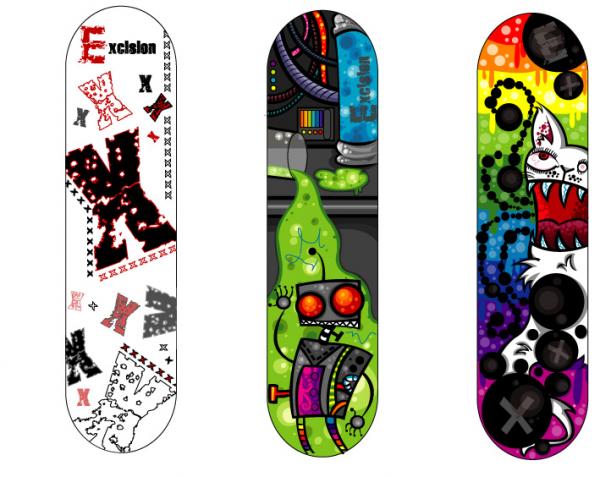
We were supposed to take from our last project of the dinosaur tooth to inspire us and the theme was predators. I chose to do a dragon theme so I did some research on that as well:


After I did the needed research, I drew out a sketch of what I had in mind for my deck design:

I then went into illustrator and started working on creating my dragon for the skate deck using the pen tool and since blue is my favourite color, I decided to go with that for the color theme:

For the background, I designed a sphere like object that I felt would fit with the image:

Then I placed everything the way I wanted it and picked out the right colors:

I then tried to play around with the possible textures to make the dragon more unique:


I also designed a logo to label my name using my initials:

Later I decided that I didn't like the textures as much as I liked the crispness of the vector art so I went back:

This is my final result for the project:

Wednesday, 23 November 2011
DMA101-Logo
For this project we had to trace a sports logo in illustrator. I choice the shark logo because I liked the colors and feel the logo gave off. I started off tracing it backwards from the bottom up. Doing the teeth was challenging as well as syncing up the lines in the triangle.

Then I started to trace the letters and that was more challenging because they have to have the same distance all around.

Adding the white and black outlines were the hardest part of creating the logo. Matching it up and spacing it out properly took a lot of tweaking and editing, but it was worth it in the end to get the final product to look this way.

Tuesday, 8 November 2011
DMA204-Product Shot
For this project, I chose to do a shot of a perfume bottle. I first played around with the different angles of the shot and the lighting.


After I chose the angel and lighting that I liked, I played around with cleaning up the photo.


After I got the details cleaned out, I played around with the different color schemes.


My final product turned out to be this:

Monday, 17 October 2011
DMA 204-Self Portrait
The assignment for photography class was to take a self portrait photo...something that represents who we are, this is my attempt at that.

DMA 101-Audi R8
So basically I had to create a mock up web site layout for Audi R8 and here is my process.
First I started off with a simple layout for the web getting the colors to match and look esthetically appealing.
First I started off with a simple layout for the web getting the colors to match and look esthetically appealing.

Then I decided that the blue car wasn't matching as well as it should so I changed the picture. I also added more of the layout option keys.

To finish things off, I added texts to the empty left corner and played around with the background colors and texture until I found the one that fits best.

Subscribe to:
Posts (Atom)